Wednesday, 20 July 2016

BizTalk ESB Toolkit: ESB Itinerary Broker Service and Broker Outport | Decide Shape


In this article, I would explain how to use ESB Itinerary Broker Service. Broker Service is kind of a decide shape in workflow.The itinerary look at a certain value (in the context), and decides on the path. Say, we receive MsgA, MsgB and both needs to be routed to different flows.

Lets define itinerary, drag an On-Ramp model and then itinerary Broker Service. Configure broker service with context resolver and then add filters as shown. Using broker outport map the corresponding filters as shown below(1,2 and 3)
Bring in orchestration extender and add static resolver and using off-ramp extender and offramp, route the message to destination system as shown below. Repeat the same steps for the other flow.

BizTalk ESB Toolkit: ESB Service Composition | Service Chaining

In this article, I would brief about service composition or chaining.

Lets say we have set of services running that allows us to booking a taxi/cab and flight and client wants invoke all the service in a sequential manner. Lets say's based on the cab booking status, invoke the the second flight service booking. This can be achieved using service composition logic. 

Itinerary service is defined as shown below, note this is a 2 way itinerary service.

This can be achieved by enabling a simple transformation at the Off-Ramp receive handler and setting routing information for 2nd service call. The dynamic 2-way send port should use ItinerarySendPassThrough send and ItineraryForwarderSendReceive receive pipelines.


BizTalk ESB Toolkit: Two-way Request Response Itinerary process | Web Service call from ESB | Part 2


This is in continuation for my previous article on Request Response itinerary process to invoking a web service and echo back service response to the client. Here we would go one step further and build our itinerary process to respond back to the client in their expected response format.

Lets say we have set of services running that allows us to booking a taxi/cab and flight based on the request made the customers, say client have their own Booking Request and Response schema and they want us book service request by them and respond back the status in their expected response format.

This can be achieved by enabling a simple transformation at the Off-Ramp receive handler and dynamic 2-way send port should used ItinerarySendPassThrough send and ItinerarySendReceive receive pipelines
Itinerary:-

Here is the itinerary flow,

{OnRamp[Static Resolver,Two-Way Receive Port] -->Messaging Extender[Static Map Resolver,ClientRequestToService Request Xform at the Receive Handler]} -->Off-Ramp Extender[Static Routing Resolver] -->{OffRamp[Two-Way Dynamic Send Port]-->Messaging Extender[Static Map Resolver, Service ResponseToClientResponse at the receive handler]}


Receive Port Configurations:
Two-way receive port with WCF-Custom webHttpbinding, shown below,

Dynamic Send Port Configurations: 
Here is a screen shot of dynamic send port,

Deploy the itinerary and start the application, then test the solution by placing a request through fiddler and wait the response of the process. Refer test results below, 

Conclusion
In this article, I illustrated how to develop an itinerary process to invoke web service and respond back to client in their response format.

Tuesday, 19 July 2016

BizTalk ESB Itinerary with Custom Orchestration Extenders


In this article, I brief you about creating a custom orchestration extenders and configure it in itinerary flows. 

Eventually, we would develop 2 Itinerary flows having custom orchestration extender and chain it.

Overall, we have a simple itinerary having two orchestration extenders, in first  orchestration extender would receive the message from the on-ramp and which would archive the message to archive path; where as second extender would act as en-richer component by enrich incoming message and route to enriched archive path.

Another itinerary would receive the message then transform and route it to target system using a custom orchestration extender.

Lets, create Receive Process Orchestration with direct bindings on receive and send; this would acts a custom orchestration extender which would archive the msg to endpoint path as specified in the resolvers.

High-level steps to be followed for create a extender, refer below screen for the associated steps.

Step 1    >> Retrieve the current itinerary step.
Step 2    >> Retrieve the Resolvers associated with the itinerary.
                Step 2.1 >> Retrieve the Resolver properties, implement routing or transaction or any web service as per requirement.
Step 3    >> If the Itinerary has further steps, advance the current or enriched message to Itinerary step by initialising correlation of ESB properties (ServiceName,ServiceState,ServiceType)

Here is custom orchestration extender,


Similarly, I have developed Enrich Orchestration extender, which would enrich the msg and route to intermediate destination.
Here is the target orchestration extender, which would receive the msg, transform and route to the destination. Lets create a simple receive location with a static itinerary resolve as shown below.

Register these custom odx extender in esb config as shown,now lets develop, itinerary flows using these extenders.

Make sure, have set the appropriate filter condition in each custom extender orchestration; ESB ServiceType and  ESB ServiceState would be Orchestration and Pending respectively; finally ESB ServiceName would Name used in the esb config.

Here is the common itinerary process, which would receive msg and archive it.

As shown, let’s add another step to the itinerary, this would enrich the msg and route to intermediate folder.

Here is the other itinerary; which would pick a message and transform it then route to the destination folder.


Lets say, we want to chain these two itinerary, this can achieved by using a helper component as shown below,this would retrieve the itinerary details and attach it to the msg and publish to other itinerary.


Let’s use this helper method in en-richer orchestration and publish the message to target itinerary from the current itinerary itself,as shown below.


BizTalk ESB Toolkit: Two-way Request Response Itinerary process | Web Service call from ESB | Part 1


In this article, I would demonstrate how to develop a 2 way itinerary process invoking a web service. This can be achieved in 2 ways, either service request transformation at On-Ramp or at Off-Ramp. If we have to use transformation at on ramp or off ramp ESB Dispatcher component should be used in the pipeline.

Itineraries:-
Service request transformation at On-Ramp
{OnRamp[Static Resolver,Two-Way Receive Port] -->Messaging Extender[Static Map Resolver, Canonical Xform]-->Messaging Extender[Static Map Resolver, Service Request Xform]}-->Off-Ramp Extender[Static Routing Resolver] -->OffRamp[Two-Way Dynamic Send Port]
Service request transformation at Off-Ramp
{OnRamp[Static Resolver,Two-Way Receive Port] -->Messaging Extender[Static Map Resolver, Canonical Xform]}-->Off-Ramp Extender[Static Routing Resolver] -->{Messaging Extender[Static Map Resolver, Service Request Xform]-->OffRamp[Two-Way Dynamic Send Port]}
Receive Port Configurations:
Two-way receive port with WCF-Custom webHttpbinding, shown below
Dynamic Send Port Configurations
Here is a screen shot of send ports, 
Deploy the itinerary and start the application, then test the solution by placing a request through fiddler and wait the response of the process. Refer test results below, 
Conclusion
In this article, I illustrated how to develop an itinerary process to invoke web service and respond back to caller.

Monday, 18 July 2016

BizTalk ESB Toolkit: Dynamic Resolvers in ESB Itinerary Process

In this article, I would demonstrate the features of dynamic resolvers by using BREs. In previous post, we had used a static itinerary resolver, now the itinerary will be resolved dynamically by the OnRamp. And itinerary will be able to do a dynamic transformation of the message received at OnRamp then based on the transformed message we would route the message to destination system. 

ESB Flow:
{OnRamp[BRI Resolver, Receive Port] -->Messaging Extender[BRE Map Resolver]}-->Off-Ramp Extender[BRE Routing Resolver] -->OffRamp[Dynamic Send Port]

The main role of the ESB Itinerary Selector is to configure an Itinerary Resolver, and here we would use BRI resolver as shown below. 
Itinerary Resolver:

  • Rule 1: If Message from RequstorA or RequestB then Set Itinerary Name as ESB.DynamicRoutingSlip; halt and exit the BRE execution. 
  • Rule 2: if any other messages received Set Itinerary Name ESB.StaticRoutingSlip; halt and exit the BRE execution. 


BRE Map Resolver
Let’s say we receive an inbound message and we would evaluate message and select the map as show below,
  • Rule 1: If Message from RequstorA then Set Transform Type as RequestAToCanoical; halt and exit the BRE execution. 
  • Rule 2: If Message from RequstorB then Set Transform Type as RequestBToCanoical; halt and exit the BRE execution. 
Routing Resolver
This BRE would use transformed message,
  • Rule 1: If Transformed Message from RequstorA then Set End Point Outbound Transport Location and Set End Point Outbound Transport Type accordingly; halt and exit the BRE execution. 
  • Rule 2: If Transformed Message from RequstorB then Set End Point Outbound Transport Location and Set End Point Outbound Transport Type accordingly; halt and exit the BRE execution. 
Itinerary Configuration:
  • OnRamp, choose the application and then select the Receive-Port. 
  • Use the itinerary service as a messaging extender with a BRE resolver. 
  • Use the itinerary service as a off Ramp extender with a BRE resolver. 
  • In Off Ramp, choose the application and then select the dynamic port. As shown, connect all the components.
Conclusion 
In this article, I covered principles of the itinerary as well as I illustrated how to develop an itinerary process with a dynamic resolver using BREs. 

Sunday, 17 July 2016

BizTalk ESB Toolkit | ESB Routing Slip Itinerary Process


In this article, I would demonstrate to develop simple itinerary. 

An itinerary is a piece of metadata that describes the path through the bus that a message should use; it can also include a set of services that should be applied to a message as it flows through the bus. It is used to determine the flow of messages through the BizTalk ESB Toolkit run time. 

Here are the three artifacts in this itinerary: 
  • An OnRamp 
  • An Itinerary Service 
  • An OffRamp 
ESB Flow:
OnRamp[Static Resolver, Receive Port] -->Off-Ramp Extender[Static Routing Resolver] -->OffRamp[Dynamic Send Port]

Here we use the ItinerarySelectReceive, which by its name indicates it will select the correct itinerary, and then simply pass the message to the MessageBox. 

The ItinerarySelectReceive pipeline is configured on the receive side and this pipeline has a component named the ESB Itinerary Selector in the first (decode) stage of pipeline processing. The main role of the ESB Itinerary Selector is to configure an Itinerary Resolver. Resolvers in the BizTalk ESB Toolkit are registered through global configuration through monikers; the configured Resolver has a moniker of “ITINERARY:\\name=ESB.RoutingSlip;version=1.0;” which means that the Resolver will look up the value of the 
ESB.RoutingSlip from the registered Itinerary store.
So far we have built an OnRamp to the BizTalk ESB Toolkit that has a single physical address where every message that arrives will be associated with the ESB.RoutingSlip itinerary by the ESB-provided pipeline and pipeline component (due to configuration of them on this ReceiveLocation). After being processed by the ReceivePort, the message will go to the MessageBox. Therefore, the next piece we need is a dynamic SendPort that can subscribe to the messages that will be published by this ReceivePort. 

Now, we need an OffRamp associated with the OnRamp. Associating the OffRamp in the Itinerary Designer with the OnRamp accomplishes this. Like the OnRamp, each OffRamp has to be associated with a physical SendPort. The SendPort will need a filter, as show below 

The Itinerary Service serving as the resolver of the URI for the endpoint and route the message to destination system. Here we use a static resolver, as show below. 
  • In OnRamp, choose the application and then select the Receive-Port. 
  • Use the itinerary service as an off Ramp extender with a static resolver. 
  • In Off Ramp, choose the application and then select the dynamic port. As shown, connect all the components. 

Deploy the itinerary and start the application, then test the solution by copying an XML document with structure defined by the schema inside the input folder and wait the response of the process in the output folders. 

Conclusion 
In this article, I covered principles of the itinerary as well as I illustrated how to develop an itinerary process with a simple static resolver. 

Friday, 15 July 2016

Introduction To BizTalk ESB Toolkit 2.2 | ESB BizTalk

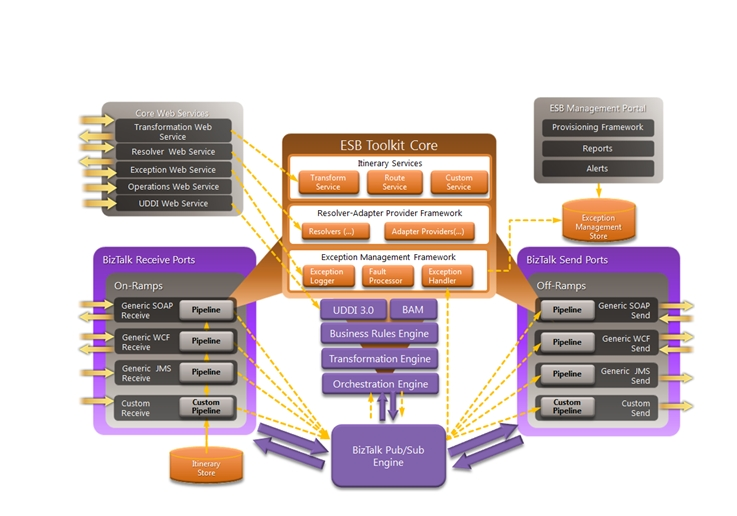
This article throws light on core components of BizTalk ESB and its architecture. 

The BizTalk ESB Toolkit provides a stable and powerful platform for services that can change as fast as your business needs them to. The main purpose of an enterprise service bus (ESB) to is to provide a common mediation layer (the “bus”) through which all services connect. By doing so, not only can many of the problems of point-to-point service connectivity be resolved, but a new level of agile service delivery can be achieved. 


The Microsoft BizTalk ESB Toolkit consists of a series of interoperating components that support and implement a loosely coupled messaging environment that makes it easier to build message-based enterprise applications. 


The services and components fall naturally into the following seven categories: 

Web services. These expose internal services such as itinerary processing, exception management, resolution of endpoints and maps, Microsoft BizTalk Server operations, Universal Description, Discovery, and Integration (UDDI) interoperation, and transformation of message content. 
Itinerary services. These include orchestration-based and messaging-based services for performing transformations and message routing. You can create custom services that participate in Itinerary processing. 
Itinerary on-ramps. These receive external messages, attach the appropriate itinerary for each message, and perform itinerary processing; they use the BizTalk ESB Toolkit Resolver and Adapter Provider Framework for dynamic resolution of endpoints and metadata. 
On-ramps. Unlike itinerary on-ramps, these receive external messages in a range of formats and transports, such as HTTP, Java Message Service (JMS), IBM WebSphere MQ (WMQ), File Transfer Protocol (FTP), Flat File, and XML. They are typical BizTalk Server receive locations that optionally use the BizTalk ESB Toolkit interop pipeline components and the BizTalk ESB Toolkit Resolver and Adapter Provider Framework for dynamic resolution of endpoints and metadata. 
Off-ramps. These implement send ports for the delivery of messages using formats and transports such as WCF, JMS, WMQ, FTP, HTTP, Flat File, XML, or any other custom formats. They are typical BizTalk Server dynamic send ports that are direct-bound to the Message Box and optionally use the BizTalk ESB Toolkit interop pipeline components and the BizTalk ESB Toolkit Resolver and Adapter Provider Framework for dynamic resolution of endpoints and metadata. 
Exception Management Framework. This includes the exception Web service, the exception management API, and components that enrich, process, and pass exception details to the ESB Management Portal. 
ESB Management Portal. This sample application provides registry provisioning, exception  mediation, alert notification, and analytics. 

Many of these components and services rely on features implemented by BizTalk Server, such as the Orchestration, Transformation, and Business Rules engines and the Message Box database.


How ESB Works 


The BizTalk ESB accepts inbound messages and operates on them by performing processes such as transformation, routing, or any other custom defined process. To specify the operations required, the core processing components require each message to have a routing slip that contains associated instructions or metadata that define the processes to apply and the tasks to execute with the message content.These routing slips are referred to as itineraries and can be automatically resolved, retrieved from a central repository, and attached to a message when it is received by an on-ramp. This routing slip approach provides loose coupling between services, meaning that the ESB does not require prior knowledge of the specific processing for each message. It just has to know what the possible range of processes is and how to apply each process. The wide range of options for specifying the available processes and the mapping between the processes and the instructions within messages provides a flexible mechanism for configuring and adjusting behavior, without requiring changes to code and redeployment of components.

Wednesday, 13 July 2016

Boomerang BizTalk Web Service for Transformation


In this article, I would show how to develop a Transformation Web Service in BizTalk with a simple custom pipeline component. This can be extended to leverage other BizTalk features.

Lets create custom pipeline component as shown below, this a simple component which writes the incoming property back to the RouteDirectTo and EPMRRCorrelationToken context properties, which would help us to achieve the echo back service or boomerang service.
Lets create a BizTalk project, add Source and Destination schema then add maps to do simple direct mapping from SourceA To DestinationA and SourceB To DestinationB. Finally, add receive pipeline and have XML Disassembler and our custom boomerang component as shown.
Lets deploy and configure the Application. Here we would just add a simple Two-way receive port and configure the receive location as shown below and configure the maps at the inbound map in the receive port.
Test and verify the process, refer below for execution. As you post the source message, pipeline at dissemble stage context properties are promoted and when it comes to resolver stage, boomerang component rewrites the context properties in such as way, it is subscribed the receive ports send side. Thus the transformed message are echoed back. Similar to boomerang!!  

Executing BizTalk Pipelines Inside Orchestration


In this walk through, I brief about how to execute the pipelines inside orchestration,
add references of Microsoft.XLANGs.Pipeline.dll and Microsoft.BizTalk.Pipeline.dll assemblies. In my earlier article (Custom Pipeline and Pipeline Component), Wrapper Order Request message was debatched in BizTalk Receive Pipeline using Custom Detacher Component. The same detaching logic is implemented inside orchestration.  Below process debatches the received message using SnippetDebatchRP receive pipeline, make orchestration transaction as atomic in case if we are executing receive pipeline.
Below process aggregates the message based on OrderID using correlation and as we are executing send pipeline inside orchestration and the process is of none transaction.

Encryption and Decryption of Sensitive Information using Pipeline Components in BizTalk

In this article, I will brief on encrypting and decrypting the sensitive information using custom pipeline component in BizTalk.

Lets create a class library project to implement Execute pipeline component as shown below, relevant reference are added to develop custom component.
Now, lets define properties to specify the cryption type (encryption or decryption) on data and data node as shown. Cryption Type is defined as enum type as below.
Here is the implementation of  IPersistPropertyBag interface, for CryptionType and Element Properties.
Implementation of IComponent Interface is shown below, based on the CryptionType property and Element Name specify, the data would be encrypted or decrypted.

Internal Encryption and Decryption implementation,
Lets create encryption receive pipeline and bring in EncryptDecrypt Component to Decode stage and define the properties as below.
Similarly, Send Pipeline to Decrypt the information
Deploy the solution and define a receive port and location then associate the EncryptData Receive Pipeline as shown below.
Similarly, define two send ports to subscribe the message received on the receive, 1 send port will have DecryptData Send Pipeline and other would be a simple pass through pipeline.
Pass through Send Pipeline, subscribes the encrypted message.
Process messages and verify the result. 
This mechanism allow us to transfer sensitive information in a is a secured manner and thus 3rd party system would be able to access the information.

Custom Funtiods in BizTalk | Encryption and Decryption in Map


In this article, I will brief about developing a custom function in BizTalk for encrypting and decrypting the sensitive information.  Actually, the right place to encrypt and decrypt sensitive information is at the biztalk pipeline using custom component, which I would cover in later topic.

Create a class library project and add the reference of Microsoft.BizTalk.BaseFunctoids assembly and then derive our functoid from Microsoft.BizTalk.BaseFunctoids.  

In the class construct provide the function name, function bitmaps to be displayed in the mapper, tool tip text, description and a functoid ID as shown. Specify category the functoid belongs to (Math, Logical, String etc..) and set input and output parameters restrictions and connection types. finally, specify the function to call.
Here is the encrpytion and decryption methods, compile the library place the dll in BizTalk Mapper folder then GAC it.
Create a new BizTalk Project, already Source, Internal Canonical and Target Schemas are defined. Let create a BizTalk map and load Source and Canonical  as shown; the sensitive information in the source would be encrypted using custom functiod which we built. In order to add the custom function to Toolbox, right click on it then select  choose items.
Then from the BizTalk Mapper tab; select the custom functiod as shown below.
Now, custom funtiod is available under the category we specified.
Another map Canonical to Target is added, where the information is  decrypt using custom function and passed to target system.
Lets now test the both the maps and verify the results.
Encryption of Data,
 Decryption of Data